

POST with a small JSON payload to the endpoint URL you configured. The payload tells you what changed; call the API to read the current state of the object.
Create a webhook
Webhooks are configured in the app, not through the API.1
Open the webhook settings
Go to Settings › Developer › Webhook and click New.
2
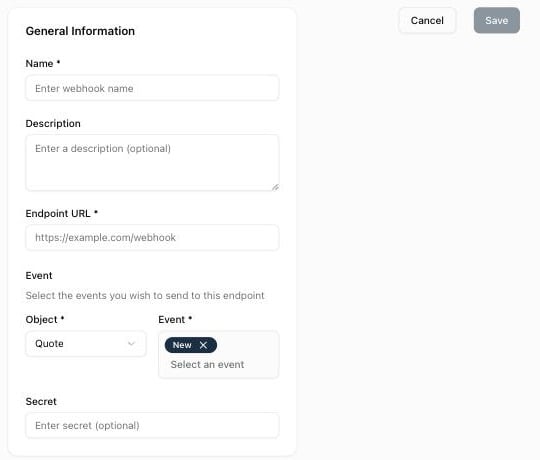
Fill in the form
- Name (required) and Description (optional) help you recognize the webhook.
- Endpoint URL (required): the public URL that receives the
POSTrequests. - Object (required): the type of object to watch: Quote, Product, Customer or Customer segment. Order and Contract are listed as “coming soon” and cannot be selected yet.
- Event (required): one or more events for that object (New, Update, Delete, and Validation for quotes).
- Secret (optional): a value of your choice that Qwoty includes in every payload so you can check that the call comes from Qwoty.
3
Save
Click Save. The webhook list shows a Last delivery column (Delivered, Failed or Never triggered) to help you debug your endpoint.
Events
The event name sent in the payload is<object>.<event>.
Events are sent whether the change was made in the app or through the API.
Payload
Every delivery is aPOST with Content-Type: application/json:
Secure your endpoint
Qwoty does not sign webhook requests: there is no signature or timestamp header. To check that a call comes from Qwoty:- Set a long random Secret on the webhook.
- In your endpoint, compare the
secretfield of the JSON body with your stored value, and reject the request (for example with401) if they differ. - Only expose your endpoint over HTTPS so the secret is encrypted in transit.
Node.js (Express)
Delivery
- Qwoty makes one attempt per event and endpoint. There are no retries: a failed delivery is not sent again.
- The request times out after 10 seconds. Any non-
2xxstatus, timeout or network error counts as a failure and is shown as Failed in the Last delivery column. - Order is not guaranteed between events.
Best practices
- Answer fast. Return a
2xxright away and do the processing asynchronously, well within the 10-second timeout. - Fetch the latest state. The payload only identifies the object: read it with the API (for example Get Quote or Get Customer) before acting on it.
- Be idempotent. The same object can trigger several
updateevents in a row; make sure processing the same event twice is harmless. - Reconcile periodically. Because failed deliveries are not retried, run a periodic sync with the list endpoints (for example List Quotes) if you cannot afford to miss an event.